
If you want to improve your gameplay in Battlegrounds Mobile India, your control layout matters more than sensitivity or device. A good layout helps you react faster, aim better, and win more fights.
In this guide, you’ll learn the best BGMI control layout, trusted by pro players, along with simple tips to master it quickly.
🔥 Why Control Layout is Important in BGMI
A proper control layout allows you to:
Move, aim, and fire at the same time
Improve reaction speed in close fights
Control recoil more easily
Play like a competitive player
Most beginners lose fights not because of aim, but because of slow controls.
Best Control Layout: 4 Finger Claw Setup
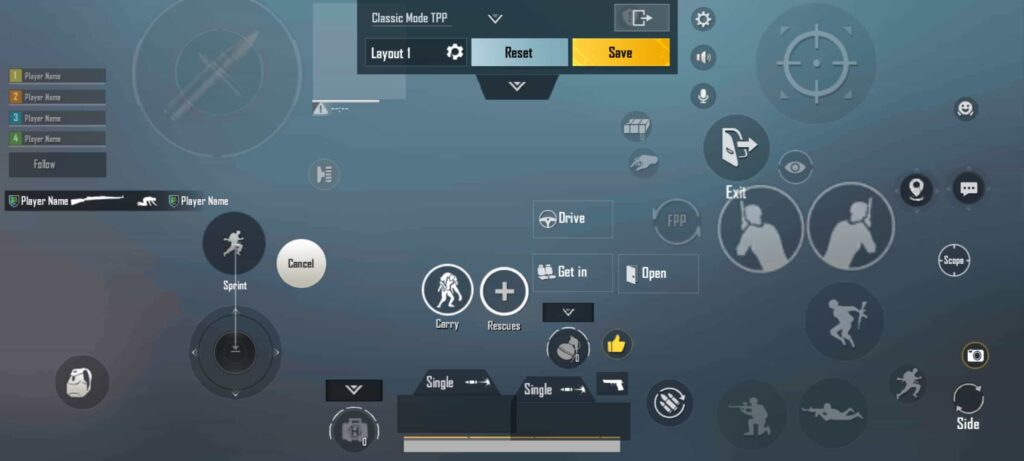
The 4 finger claw layout is considered the best setup for BGMI players.
👉 How It Works:
Left Thumb → Movement (Joystick)
Right Thumb → Aim (Camera control)
Left Index Finger → Fire button
Right Index Finger → Scope / Peek
✅ Benefits:
Faster shooting reaction
Better spray control
Smooth movement + aim combination
Ideal for both close and long-range fights
🎮 Perfect Button Placement (Pro Setup)
To make your layout effective, follow this structure:
🔹 Left Side:
Joystick → Bottom left
Fire button → Top left (for index finger)
🔹 Right Side:
Scope button → Top right
Peek buttons → Near scope
Jump + Crouch + Prone → Bottom right
📌 Keep your layout clean and not overcrowded. This improves visibility and control.
⚙️ Best Settings to Use With This Layout
For maximum performance, enable these settings:
Gyroscope → Always ON
Peek & Fire → Enable
Hold to ADS → ON
These settings help in:
Better recoil control
Faster aiming
Accurate sprays
📏 Recommended Button Size & Opacity
Fire button → 140% to 180%
Scope → 120% to 150%
Joystick → 100% to 120%
Opacity → 40% to 70% (adjust for visibility)
🧠 Pro Tips to Master Your Controls
Practice daily in TDM for 15–20 minutes
Don’t change layout frequently
Adjust sensitivity slowly
Use gyroscope for better aim
Focus on muscle memory
Consistency is the key to improving your gameplay.
🆚 Which Layout Should You Choose?
Player Level
Recommended Layout
Beginner
2 or 3 Finger
Intermediate
✅ 4 Finger Claw
Pro Players
4 or 5 Finger
🏁 Final Conclusion
The 4 finger claw layout is the best control setup for BGMI in 2026. It gives you the perfect balance of speed, accuracy, and control.
If you are serious about improving your gameplay, switch to this layout and practice regularly.
BGMI ka 4-finger control layout isliye best mana jata hai kyunki isme aap minimum fingers ke saath maximum control pa sakte ho. Isse aapki accuracy fast hoti hai, movement smooth rehta hai, aur gameplay me unnecessary touches kam ho jate hain.
4-finger setup me aap 5 ya 6 finger layout ke comparison me zyada comfortable feel karte ho, aur long time tak bina pain ke game khel sakte ho.
4 Finger Layout ke Benefits
- Fast reaction aur better reflex
- Smooth movement + aim control
- Kam mis-touch (galat touch kam hota hai)
- Long gaming sessions me comfort
- Screen ka maximum use
Control Layout Tips (Important Tricks)
- Kam buttons dikhao (Clean layout rakho)
Control layout me jitne kam visible buttons honge, utna gameplay clean rahega. - Smart button placement karo
- Scope ke paas nade cancel button rakho
- Scope ke side me jump button rakho
(Kyuki jump aur scope ek saath use nahi hote)
- Fire button ke paas climb button mat rakho
Kyuki jab aap climb karte ho, tab fire nahi hota — isse gameplay disturb hota hai. - Layout banane se pehle socho
Pehle kisi accha control layout ko observe karo, samjho, fir apna layout set karo. - Baar-baar layout change mat karo
Zyada changes karne se muscle memory aur accuracy dono kharab ho jati hai. - Backup jarur lo
Agar aapne apna control layout, sensitivity aur settings khud se banayi hain, to:
- Screenshot le lo
- Ya screen recording kar lo
Taaki future me reset hone par problem na aaye.
Final Tip
4-finger layout me fingers ko move karne ke liye proper space milta hai, jisse:
- Galat touch kam hota hai
- Control better hota hai
- Aur overall gameplay improve hota rehta hai